How to build a coworking directory that remote workers actually rely on.
A practical plan for a coworking directory: choosing the city or kind of worker to serve, the desk, price and amenity details people compare, how featured spaces, operator memberships and office leads pay for it, where the first spaces come from, how to keep prices and listings honest, the searches to rank for, and how to launch.
Free for 15 days · No credit card · Plans from $19 a month
Choose the workers you serve and the city you start in.
Coworking searches come from very different people. A freelancer wants a quiet hot desk ten minutes from home. A visiting consultant needs a day pass and a meeting room tomorrow morning. A startup of six wants a private office with a three-month term. A company with remote staff in one city wants a few dedicated desks near where they live. Each of them asks a question a map pin cannot answer: what does it cost, what is included, and can I get in at 7 am on a Sunday?
Many of the large office search sites are run by or for brokers, who are paid by operators when a team signs for an office. That shapes what they show: big chains and private suites, with prices hidden behind a call. Independent spaces, coffee shop style coworking, library work rooms and day passes are underserved.
Angles that work
- One city, organized by neighborhood, with every space from the chains to the two-room independents.
- Remote work destinations: a directory for traveling workers in one country or region, focused on day passes, internet speed and short stays.
- Suburbs and small towns, where people who left the big-city office now want a desk close to home.
- A specific kind of space: coworking with childcare, women-focused spaces, studios for creative work, or spaces for scientists and labs.
Look at where people ask today: nomad groups on Facebook and Reddit, local startup Slack communities, and the noticeboards at accelerators and university entrepreneurship programs.
List desks, prices and amenities the way people compare them.
People choosing a coworking space compare like shoppers: desk type, monthly price, what is included, and how far it is. Set up categories around the kind of space someone needs, and put everything comparable in fields.
Prices are the field people want most and operators share least. Ask for "from" prices for a day pass, a monthly hot desk and a monthly dedicated desk, and accept that private office prices may say "on request". Even partial prices put you ahead of sites that show none.
Amenities are where small spaces win. A space with fast fiber internet, two phone booths, a kitchen and free parking can beat a chain on price and quiet. Make those checkboxes, so someone can filter for exactly what matters to them. Access hours deserve their own field too: early starters and night owls rule out half the spaces on that alone. In Yclas, custom fields can be text, numbers, dropdowns, checkboxes or dates, and each one shows as a search filter.
| Category | Example listings | Fields people filter on |
|---|---|---|
| Coworking spaces | Independent spaces, chain locations | Day pass price, hot desk per month, dedicated desk per month, hours, 24/7 access |
| Private offices | Team offices of 2 to 20 people | Team size, minimum term, price from, furnished, own lockable door |
| Meeting and event rooms | Boardrooms, workshop rooms, event floors | Seats, price per hour or day, screen and video call setup, catering allowed |
| Virtual offices | Business address and mail handling | Mail scanning, mail forwarding, phone answering, use as registered address |
| Studios and maker spaces | Photo studios, workshops, shared labs | Equipment, size in square feet, noise allowed, access hours |
| Day pass and drop-in spots | Coworking cafes, hotel work lounges | Price per day, internet speed, power at every seat, quiet area |
Internet speed is worth a number field in Mbps: remote workers search for it more than almost any other amenity.
Earn from operators once your pages send them members.
A coworking member can be worth a lot to an operator over a year, and a team that signs for a private office is worth much more. That gives a coworking directory better money options than most directories, but only once you have visitors. Start with every space listed free, and do not charge until operators see members arriving from you.
How coworking directories earn
- Quote requests for offices and teams. A visitor fills in team size, budget and move-in date, and the request goes to the spaces they choose. These leads are the most valuable thing you can offer operators.
- Featured spaces at the top of a neighborhood or day pass page.
- Operator memberships for chains and groups with several locations, covering richer pages for each site and a badge.
- Banner spaces for accountants, lawyers who work with startups, business banks, office furniture sellers and local tech events.
Stay away from acting as a broker. The directory helps people compare and contact spaces; tours, contracts and payments stay between the member and the operator.
| Model | Works when | Switch it on |
|---|---|---|
| Quote requests | Teams ask for offices through your pages | As soon as the first requests arrive, to show value |
| Featured spaces | Neighborhood pages get regular visits | When several spaces compete in one area |
| Operator memberships | Chains or groups run several locations | Once two or three operators have claimed their pages |
| Pay to post private offices | Offices listed are worth a lot to the operator | When the office category gets steady searches |
| Banner spaces | Service businesses want freelancers and founders | When you can show monthly visitors |
Get every space in your first city listed.
Coworking spaces are businesses with addresses, websites and often published day pass prices, so a complete first city is within reach in a week or two of work.
- Import from Google Places. Search for coworking space, shared office, business center and virtual office in your city. With your own Google key, Yclas brings in the name, address, phone, website and opening hours of each place, though no photos. Then go through each space's own site and add prices, desk types and amenities.
- Add the operators' full networks. Chains list all their locations on their websites. Put them in a spreadsheet and import it as a CSV rather than adding one by one.
- Find the spaces that are hard to find. Libraries with bookable work rooms, hotels with work lounges, cafes that sell desk passes, university innovation centers and spaces run by economic development groups. Local startup communities usually know them all.
- Invite owners to claim their page. A short email works: "your space is listed with these prices, claim the page to correct them and add photos". Operators fix wrong prices quickly, which is a good reason to show your best estimate.
Ask local coworking associations and community managers' groups to share the directory once the first city is full. Community managers talk to each other, and one recommendation in their group reaches most spaces in town.
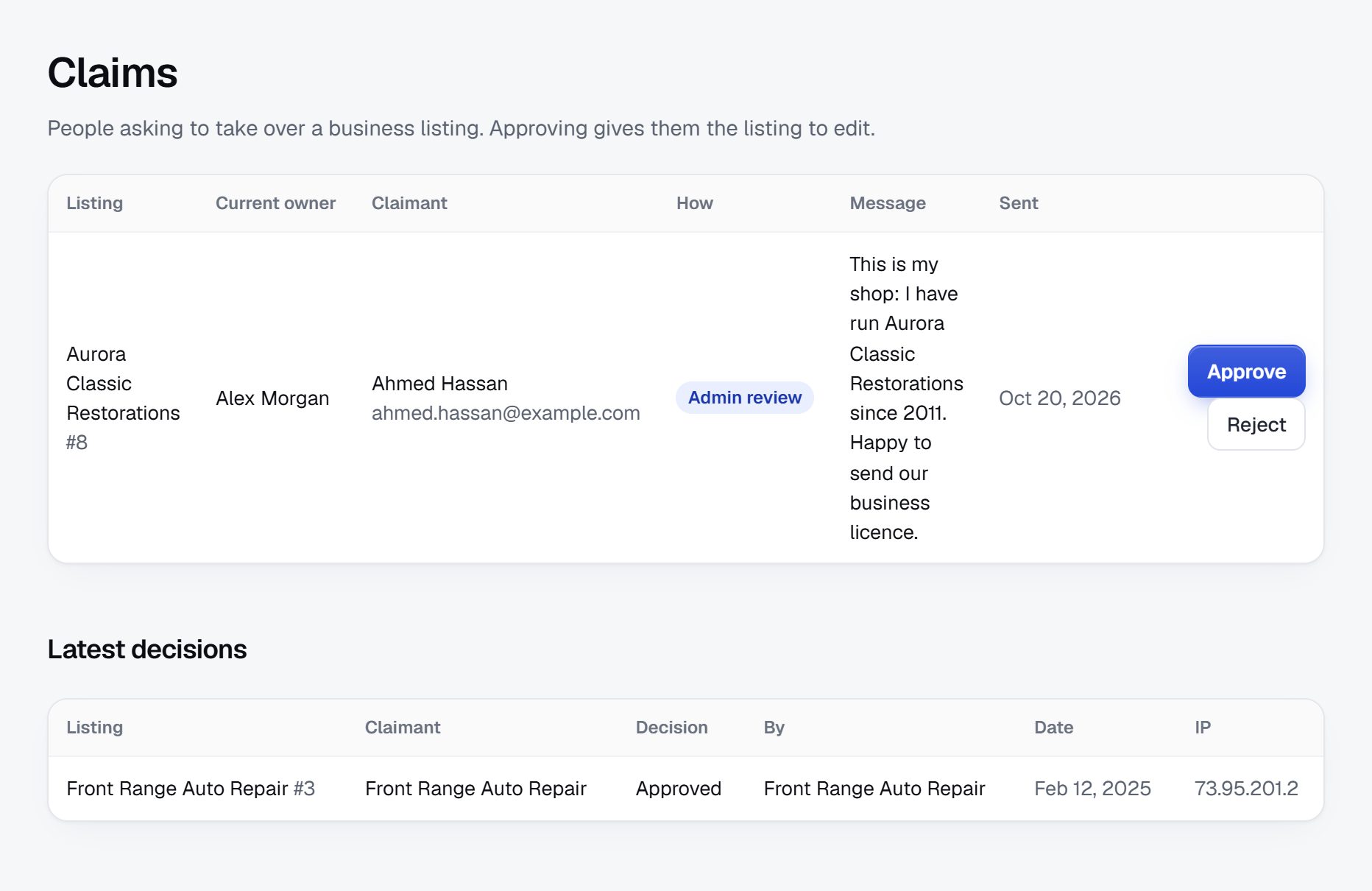
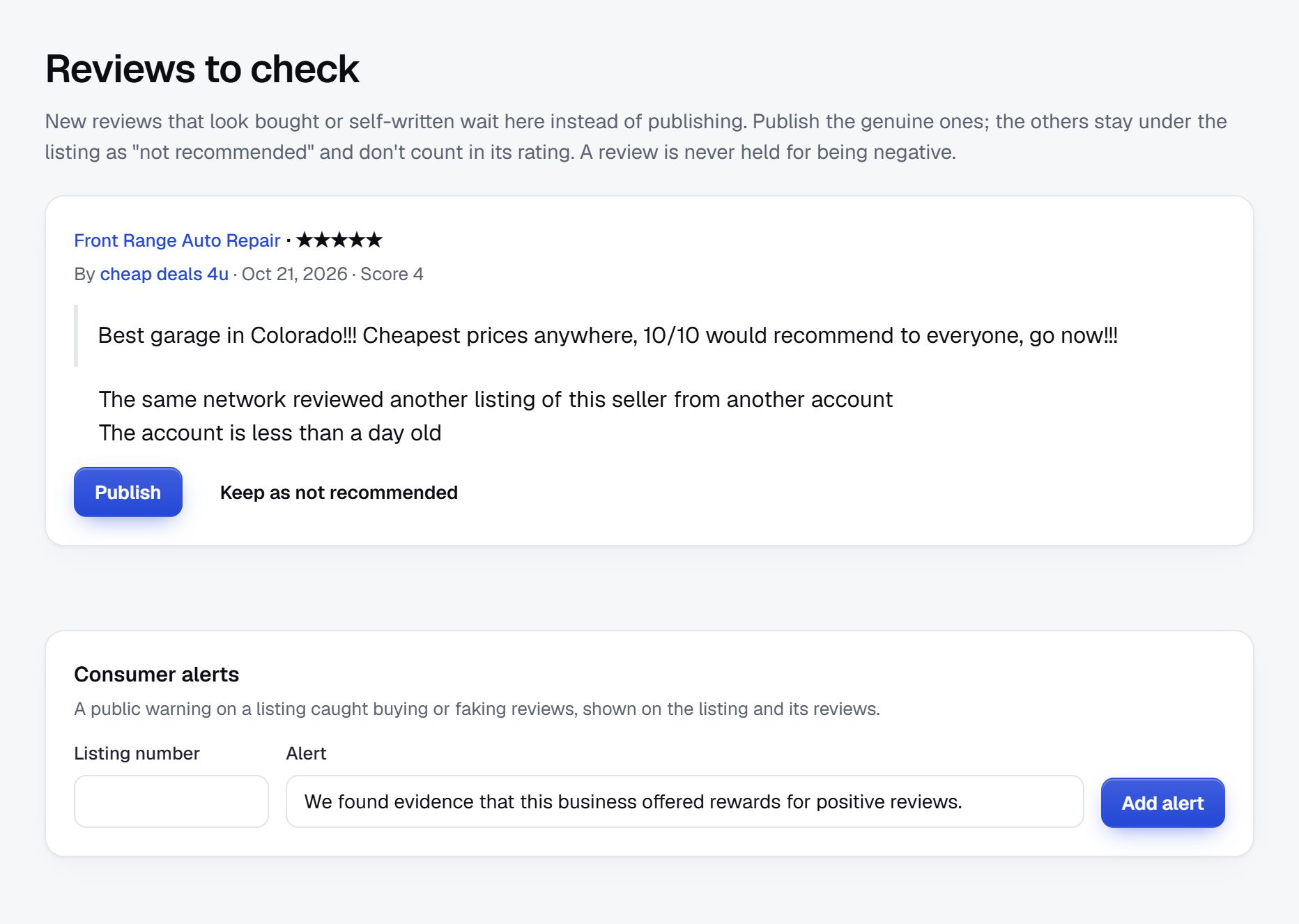
Keep prices honest and leads clean.
The trust problems on a coworking directory are mostly about accuracy. Prices change, spaces close or change hands, and some listings are not really spaces at all.
What to watch for
- Brokers posing as operators. Some brokers create listings for spaces they do not run, to capture leads. Ask whoever claims a page to show they work for the space, for example by replying from an email at the space's own domain.
- "From" prices that never apply. If members report that the advertised day pass is always sold out or does not exist, ask the operator to correct it or remove the price.
- Closed spaces. Coworking spaces open and close often. Let visitors report closures and check them quickly.
- Virtual office misuse. Business addresses can be used to make a company look bigger or more local than it is. List virtual office services as the operator describes them, and check the rules where you operate before describing any address as suitable for company registration.
- Review manipulation. Watch for groups of reviews written in one week. Operators can reply to reviews, which helps when a complaint is about one noisy day.
Quote requests carry names, team sizes and budgets. Send each request only to the spaces the visitor chose, and say so on the form.
Accurate prices and real operators are what make people come back before their next move.
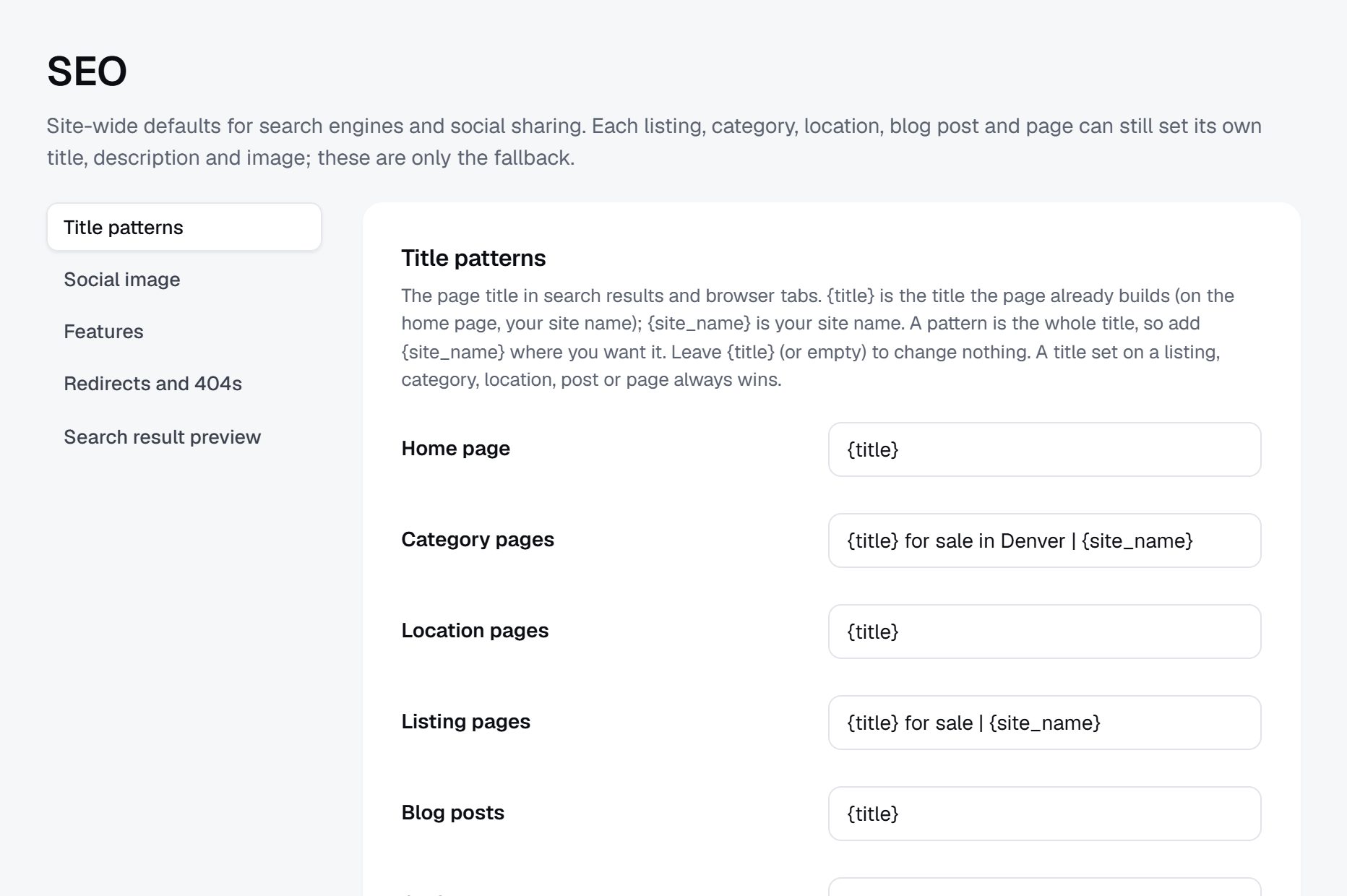
Rank for desk, office and day pass searches.
Coworking searches combine a place with a need: "coworking space Lisbon", "day pass coworking near me", "private office for 5 people Chicago", "24 hour coworking Austin", "virtual office address Miami", "meeting room rental by the hour Denver" and "coworking with childcare Seattle". The more specific the search, the more likely your page can rank above the big sites.
Pages to build
- City and neighborhood pages listing every space, with your own short notes on the area: transit, parking, cafes nearby.
- Pages by desk type: day passes, dedicated desks, private offices and meeting rooms in each city.
- Amenity pages that answer common filters: 24/7 access, pet friendly, free parking, phone booths.
- Remote work guides for traveling workers, with internet speed and day pass prices side by side.
Content ideas
- "Hot desk or dedicated desk: what you get for the price."
- A coworking price guide for your city, updated twice a year from the prices on your listings.
- "What a day pass usually includes", with real examples from listed spaces.
- Interviews with community managers about who works at their space.
Put the neighborhood and desk types into every space's page title, so each page matches the searches people make.
Launch with the local startup and freelance crowd.
Coworking demand follows the work calendar. January and September are when freelancers and small teams rethink where they work, and many companies plan office changes around the start of a quarter. In warm cities, remote workers from colder places arrive for the winter months. Have your first city complete before the season that matters most there.
Partners
- Startup programs: accelerators, incubators and university entrepreneurship centers send graduating teams looking for their first office.
- Freelancer and remote work groups, online and in person, where the same question about desks comes up every month.
- Accountants and business banks that serve new companies.
- Relocation services for people moving to the city to work remotely.
Launch checklist
- Every coworking space in the first city listed, with at least a day pass or monthly price where one is published.
- Neighborhood pages and desk type pages written.
- The quote request form tested from start to finish with a friendly operator.
- A price guide for the city, ready to post in local groups.
- An email to every operator on launch day with a link to their page.
- A way for visitors to report a closed space or a wrong price.
When the first city is working, pick the next one where your remote worker visitors are already asking.
A worked example: a desk guide for the Research Triangle.
Take a fictional directory called Triangle Desk Guide, covering coworking across Raleigh, Durham and Chapel Hill in North Carolina. The region has a few chain locations downtown, many independent spaces in converted warehouses and storefronts, university-linked innovation centers, and a growing number of suburban spaces in towns where remote workers bought houses. Researchers, startup founders and remote staff of out-of-state companies all need desks here, and each group wants something different.
Categories
- Coworking
- Day passes and hot desks
- Dedicated desks
- Offices
- Private offices for 1 to 5
- Team suites for 6 and more
- Rooms by the hour
- Meeting rooms
- Podcast and video studios
- Virtual offices
Who it serves
Remote employees told to find a desk near home and expense it, founders leaving a university program who need their first office, consultants in town for a week of client meetings, and suburban parents who want a quiet desk ten minutes from school pickup. Operators of small spaces read it too, to see what their neighbors charge.
How it started
The founder ran member events at one independent space and kept a shared spreadsheet of every other space in the region, because members asked about them whenever they moved house. He turned that spreadsheet into a CSV import, filled in day pass and hot desk prices from operators' own sites, and wrote to every community manager he had met at local meetups. The independents claimed their pages within weeks; the chains followed once the suburban pages started ranking. That first spring he also bought a day pass at twelve spaces and wrote a few honest lines about each, which became the most read part of the site.
How it makes money
Office quote requests are the main income: a team enters headcount, budget and move-in month, chooses up to five spaces, and operators that want those leads pay a monthly fee to appear in the request form. Featured placement on the downtown Durham and Raleigh pages sells steadily, two operators with several locations each pay a yearly membership, and a business bank and an accounting firm take banner spaces on the startup pages. Every space keeps a free basic page.
| Listing | Price from | Key details |
|---|---|---|
| Foundry Row Coworking, Durham | $25 day pass, $250 a month hot desk | 1 Gbps fiber, four phone booths, 24/7 access for monthly members, bike storage |
| Glenwood Suites, Raleigh | Office for 4 from $1,600 a month | Three-month minimum term, furnished, lockable door, two meeting room hours a day included |
| Carrboro Quiet Room | $15 day pass | Silent floor with no calls, opens at 7 am, free street parking |
| Cary Village Workhub | $300 a month dedicated desk | Childcare partner next door, full kitchen, monitor at every desk |
| Brightleaf Podcast Studio | $60 an hour | Two microphones, sound-treated room, video setup, engineer on request |
Every space and price in this table is fictional.
The first 90 days, measured by prices on the page.
Coworking has fewer hard seasons than yoga or schooling, but September and January are when freelancers and small teams rethink their setup, and quarter starts are when companies sign for offices. Pick one of those as your launch date and work back 12 weeks.
The early weeks build the list and the price fields, which is where this kind of directory wins or loses. The middle weeks belong to community managers: they know every space in town, they move between operators, and one good relationship often opens the door to several spaces. The final weeks put the quote request form through real tests and get the guide into the groups where remote workers ask for desk advice.
Judge progress by price coverage, not by listing count. A neighborhood page with twenty spaces, fourteen of them showing a day pass or monthly price, is far more useful than forty pages that all say contact us.
Set aside a few day passes for weeks 5 to 8. A morning spent in a space tells you more about noise, light and call booths than any operator description, and two lines of firsthand notes make your page more useful than the operator's own.
| Weeks | Focus | Done when |
|---|---|---|
| 1-2 | Define the city and neighborhoods; set desk type, price, access hours and internet speed fields | Two community managers have reviewed a sample page and agree the fields fit |
| 3-4 | Import spaces from Google Places; add chain locations and hidden spots from a spreadsheet | Every space you can find in the first city is listed, library rooms and hotel lounges included |
| 5-6 | Collect published prices and amenities from each operator's site | At least two thirds of spaces show a day pass or monthly price |
| 7-8 | Send claim invitations and meet community managers at local events | A third of spaces are claimed, with prices confirmed by the operator |
| 9-10 | Build and test the quote request form; write neighborhood and desk type pages | Two test requests have reached operators and both got replies |
| 11 | Write the city price guide; line up startup programs, banks and relocation services | Four partners have agreed to share the directory at launch |
| 12 | Launch, email every operator, post the price guide in remote work and startup groups | Real quote requests are arriving and closure reports are checked within days |
Ways to build a coworking directory, and the features it cannot skip.
A coworking directory asks a lot of its price fields: they must hold numbers or "on request", side by side with amenity checkboxes, access hours, a map by neighborhood, owner claims, reviews with replies, and above all a quote request form that sends one team's details to several chosen spaces. It does not need desk booking. Operators already sell passes and memberships through their own systems, and handling those payments would turn you into a reseller with refunds to manage.
A custom build with developers fits a founder who wants live desk availability from each operator's management software, or a tool that adds up the full yearly cost of a team office. Both depend on operators sharing data, and many will not.
A directory script or WordPress plugin on your own server fits someone who already runs a remote work blog. It gives full control of pages and lead forms, but quote requests carry names and budgets, so spam protection and secure hosting become your job.
A hosted builder such as Yclas provides claims, quote requests, hours, maps and featured places without a server, so your time goes into prices and relationships with community managers.
On any route, check that one operator can look after several locations from one account, because the chains will ask for that on the first day. Ask too how a page passes to a new operator when a space changes hands, so its reviews and history are not lost.
| Route | Fits when | Watch out for |
|---|---|---|
| Custom build | Live availability or office cost comparison is the core idea | Operators rarely share live data, and the build cost lands before any income |
| Self-hosted script or plugin | You already have a remote work blog and an audience | Spam on lead forms, security updates and protecting the budgets teams submit |
| Hosted directory builder | Your edge is complete listings and honest prices | Confirm that price fields can hold ranges and that multi-location operators are easy to manage |
What a coworking directory costs to run.
The software is the smallest part of the bill. Most of the cost is your time in the first months: finding the first listings, answering questions and checking what gets posted.
Expect to pay small Google Places charges on your own key during the import. If you target traveling workers, a short visit to test day passes and internet speeds yourself makes the first city guides far more useful.
| Cost | Typical range | On Yclas |
|---|---|---|
| Domain | $10 to $20 a year | Your own, with SSL included |
| Software and hosting | $0 to $100+ a month, plus plugins and updates | Starter $19 a month, Professional $99 |
| Design | $0 to $100 for a theme, or a designer | 109 looks included |
| Payment fees | About 3% per payment | Your Stripe or PayPal fees; Yclas takes nothing |
| Business data | Free if you collect it, or a few cents per page of Google results | Paid to Google, with your key |
| Your time | 5 to 10 hours a week at the start | Finding listings, moderation, support |
Mistakes that make remote workers stop trusting your listings.
- Publishing only "contact us for pricing". If no page shows a number, visitors go back to asking in Facebook groups. Show every published price with the date you found it, and let operators correct your estimates when they claim.
- Letting brokers claim pages. A broker who controls a space's page captures every lead and adds a fee the member never sees. Confirm that the person claiming works at the space, and label any listing an agent posted. If an operator says a broker created its page, hand the page to the operator the same day.
- Calling every coffee shop with wifi a coworking space. Listing each cafe with power outlets floods the map and annoys people who need a real desk and a call booth. Keep cafes in a clearly named drop-in category, with honest notes on noise and time limits.
- Ignoring internet speed. Remote workers on video calls care about upload speed and reliability more than almost anything else. Ask operators for measured speeds, label them as stated by the operator, and invite members to report problems. Gigabit fiber shared by eighty members on one old router is not the same as fast internet, and member reports will tell you which spaces overstate it.
- Merging staffed hours and member access. A space with a front desk until 6 pm may let members in at any hour, and one that looks open on a map may lock its doors at 5. Someone working with a team in another time zone needs to know which. Make them two fields.
- Selling quote requests you cannot deliver. Charging operators for leads before the form has produced a single one brings refunds and resentment. Send requests free until the flow is steady, then charge.
- Covering a whole country at launch. A national map with three spaces per city ranks for nothing and helps nobody. Go deep in one metro area, then add the next city your visitors come from.
- Leaving closed spaces up. Operators close, merge and rebrand often. Each stale page sends someone to a locked door, and that person will not search your site again. Recheck every page at least twice a year and act on closure reports within days.
- Stopping at downtown. Many remote workers now want a desk near home rather than a long commute, and small spaces on suburban main streets have very few ways to be found. Cover them as carefully as the downtown chains, with parking and the distance to local schools in mind.
Coworking terms worth learning before you call operators.
Operators, brokers and members use these terms, sometimes with slightly different meanings.
| Term | What it means |
|---|---|
| Hot desk | Any free seat in a shared area, with no desk kept for you. |
| Dedicated desk | A desk reserved for one member, usually in a shared room, where you can leave your things. |
| Day pass | Entry to the shared area for a single day, without a membership. |
| Private office | A lockable room for one person or a team, rented by the month or longer. |
| Virtual office | A business address and mail handling with no desk, sometimes with phone answering. |
| Flex space | An industry term for offices rented on short, flexible terms, coworking included. |
| Operator | The company that runs a coworking space, whether it owns the building or leases it. |
| Community manager | The person on site who runs the space day to day, welcomes members and organizes events. |
| Broker | An agent who finds offices for companies and is usually paid a fee by the operator. |
| Meeting room credits | Hours of meeting room use included in a membership each month. |
| Access hours | The times members can get into the space, which may differ from staffed hours. |
| Breakout area | An informal shared corner for short meetings, calls or breaks away from the desks. |
| Managed office | A private suite an operator fits out and runs for a single company. |
| Mbps | Megabits per second, the usual unit for advertised internet speeds. |
The same steps for a coworking directory on Yclas.
- Describe your directoryThe setup wizard writes the categories, an About page and example listings from one sentence.
- Add fieldsHours, services, areas served, prices: the details people search by, as filters.
- Fill itImport businesses from a spreadsheet or Google Places, then check them.
- Bring owners inOwners claim their page, update it and answer reviews.
- EarnSwitch on featured places, banners or memberships when visits arrive.
How much money do I need to start a coworking directory?
Very little beyond your time. Budget for the site, a domain, Google Places usage during the import, and perhaps a few day passes to visit spaces and write honest notes.
Should I show prices if operators do not publish them?
Show the prices operators publish, and leave the field empty or marked "on request" where they do not. Invite operators to claim their page and fill in their own numbers.
Can people book desks through the directory?
No. The directory helps them compare and contact spaces; desk passes, tours and contracts are handled by the operator directly.
How do I make money from a coworking directory?
Quote requests from teams looking for offices are the strongest option, followed by featured spaces and memberships for operators with several locations. Start charging once operators can see members coming from you.
Will the big chains care about a small directory?
Not at first. Independent spaces usually claim pages first because they have fewer ways to be found. Chains follow once your pages rank for their neighborhoods.
Is it legal to list a space without asking?
Names, addresses, hours and published prices are public business information that directories commonly list. Write your own descriptions, avoid copying photos, and remove a page if the owner asks. Check the rules where you operate.
How do I stop brokers from taking over the listings?
Only let a page be claimed by someone who shows they work for the space, and label any listing that comes from an agent. Remove listings for spaces that do not exist.
Should I include hotel lounges and libraries?
Yes, as their own drop-in category. People who need a desk for one day often prefer them, and few other sites list them, but be clear about time limits and noise. Some hotels limit lounges to guests, so check before listing them.
How often should prices be checked?
At least twice a year, plus whenever an operator or member reports a change. Show the date each price was last confirmed, so visitors know how far to trust it. Operators who claim their pages usually fix prices themselves, which spreads the work.
Do traveling remote workers need a separate site?
Not necessarily. Day pass pages with internet speed, opening times and transit notes serve travelers well, and you can add travel guides later if those pages draw visitors from other countries. Notes on visas or local tax for visiting workers belong in guides that tell readers to check the rules where they work.
What should the quote request form ask?
Team size, budget range, move-in month, preferred neighborhoods and the kind of space. Keep it short, and say plainly that only the spaces the visitor picks will receive it. A free text box for anything unusual, such as a need for lab benches or a dog-friendly floor, catches the rest.
What if an operator disputes a review?
Invite the operator to reply publicly, and remove the review only if it breaks your published rules. Complaints about one bad day are common, and a calm reply often reassures readers more than a perfect score.
Related pages.
The parts of Yclas this leans on.
You have the plan. Now map every desk in your first city.
Describe your site in a sentence and the setup wizard writes the categories, example listings and a look. Free for 15 days, no credit card.
Start my directory